
Lockly Home
PIN Genie Inc.House & Home
3.894.00 Reviews
- Version
- 1.5.7
- Installs
- 50.00K
- Age Rating
- Everyone
Screenshots
Our Review of Lockly Home
 Analysis by Appyee
When a phone becomes the way I open, manage, and check a smart lock, trust matters more than a polished interface. Lockly Home is a House & Home app from PIN Genie Inc. that is designed for people who already use Lockly devices and want to handle them from one place. I approached it less like a general smart-home dashboard and more like a companion for a security product: useful when it reduces daily friction, but only worthwhile when the account and device choices feel understandable.
My overall impression is positive but measured. The app gives Lockly owners a practical mobile control point, especially when several people need access to the same property or when checking a lock remotely is part of a routine. At the same time, this is not an app I would recommend simply because it is free. A lock-management app sits close to the most sensitive parts of a home, so I would take a little time to review its setup screens, account options, device access, and any purchase prompts before relying on it every day.
What Lockly Home is really for
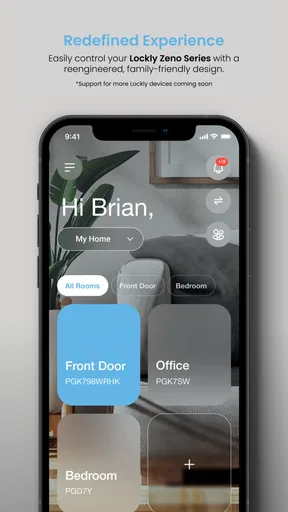
The app’s role is straightforward: control, manage, and monitor compatible Lockly devices. That makes it most relevant to someone who has chosen Lockly hardware, rather than to a person looking for a universal smart-home controller. If your home uses another brand of lock, installing this app will not make that device part of the Lockly system. Its value depends heavily on owning the right hardware first.
I also like that the app has a focused purpose. A broad home-automation app can be convenient, but it can also bury an important action under rooms, scenes, cameras, thermostats, and notifications. A dedicated lock companion has a clearer job. When I want to think about who can access a door, whether a device is available, or how the lock fits into a household routine, a narrower tool is easier to understand than a crowded dashboard.
That focus creates an important trade-off. Lockly Home may be a good fit for a Lockly-equipped apartment, house, office, or rental property, but it is not a reason by itself to replace an existing ecosystem. If your priority is operating locks from the same app as lights, alarms, and cameras from several manufacturers, a wider smart-home platform may suit you better. The dedicated approach is strongest when the lock is the center of the decision.
The app is free to install, with optional in-app purchases ranging from $1.99 to $139.99 per item. I would treat that range as a reason to read each purchase screen carefully rather than assuming every useful control is included at no cost. A free download is convenient, but the real question is which functions are available with the hardware and account you already have, and which choices may lead to an additional charge.
First setup and the trust checkpoint
The first launch is more important here than with a casual household app. I would prepare the lock, its installation information, and the account details before beginning, then move slowly through every screen that asks to pair, authorize, invite, or purchase. Rushing through setup can make it harder to remember which person received access or which device was connected to which account.
This is also the moment to decide who should be the primary account holder. In a family, that might be the person responsible for the property. In a rental, it may be the owner or manager rather than a temporary occupant. Choosing that role carefully avoids a common practical problem: the person who first installs an app becoming the accidental long-term administrator even though someone else needs to manage the lock.
I would also write down the device name in a way that makes sense later. “Front door” is more useful than a vague label if the app eventually contains several Lockly devices. Clear naming is not glamorous, but it reduces the chance of changing the wrong lock when you are tired, away from home, or responding to a message from another household member.
Controls that matter in daily life
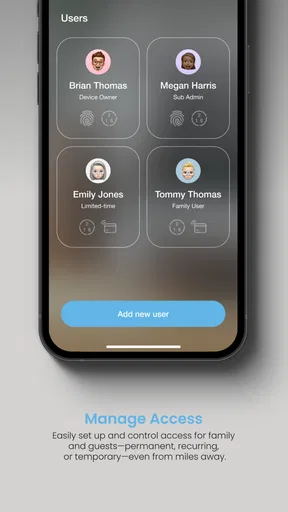
The strongest use case is shared access. Imagine a parent leaving for work while a cleaner, relative, or delivery helper needs to enter later. Instead of passing around a physical key or relying on a message that says where a spare is hidden, the owner can use the Lockly setup to manage access through the device ecosystem. I would still avoid treating digital access as automatically safer; every invited person should have a clear reason to retain it, and old access should be reviewed when circumstances change.
A second useful scenario is a small rental or guest property. A manager may need to coordinate entry without being physically present, while a guest needs simple instructions rather than a complicated smart-home account. The app can be helpful as the management side of that arrangement, but only if the owner keeps control of the main account and separates temporary convenience from permanent authority.
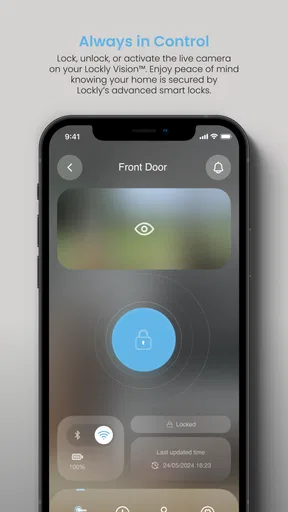
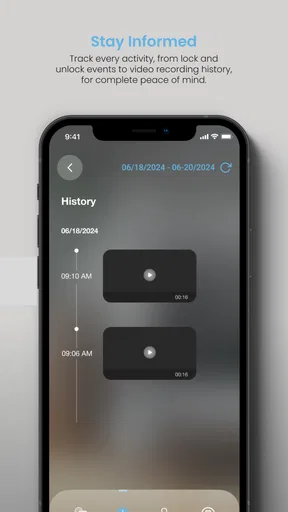
For a household, monitoring can be more valuable than remote control alone. A person who worries about whether a door was handled after children left for school may appreciate having a dedicated place to check the lock. I would use that information as reassurance, not as a substitute for a complete security plan. A phone app cannot remove the need to maintain the physical lock, keep the phone protected, and make sure every authorized user understands the normal entry process.
One practical tip is to create a routine for access cleanup. I would review who should still have permission whenever a guest leaves, a contractor finishes work, a roommate moves out, or a family arrangement changes. That review is easy to postpone because the lock continues working, but unused access is precisely the kind of detail that becomes invisible until it matters.
Account controls and user choice
My trust in an app like this depends less on the word “smart” and more on whether I can see what I am choosing. During setup and everyday use, I would look for clear distinctions between the owner, regular users, guests, and device-level actions. If a screen combines several roles or uses vague wording, I would pause before confirming it. Security tools should make authority legible.
I would also pay attention to whether an action is reversible. Removing a person from access, changing a device name, or adjusting a setting should not feel like an irreversible leap into an unknown state. When a control has a meaningful effect on a door, I prefer a confirmation step that identifies the device and the account involved. That small pause is helpful, especially for people managing more than one property.
Another useful habit is to keep the app and the phone itself under control. Use a screen lock on the phone, avoid leaving the account open on a shared device, and be careful when handing the phone to someone who only needs to see a status. The app may be free, but the account connected to a lock is not something I would treat like a recipe or shopping-list login.
Lockly Home is marked for Everyone, which makes it approachable for a broad household audience. That does not mean every user should receive the same authority. An older family member may need a simple way to enter, while a child or occasional visitor may need a different arrangement. The age label describes general suitability; it should not replace the owner’s judgment about which people receive control.
Data-sensitive moments deserve attention
Lock management creates sensitive moments even when the interface looks ordinary. Pairing a device, signing into an account, adding another person, checking status, and responding to a notification can all reveal information about how a home is used. I would read the app’s visible privacy and permission prompts rather than accepting them automatically, and I would revisit those choices after an update.
I am deliberately cautious about making claims beyond what the app itself shows. A reviewer should not promise that a security app collects nothing, shares nothing, or protects every situation without examining its current disclosures and the phone’s actual permission panel. My advice is practical: check what access the app requests, ask whether each request makes sense for the control you want, and decline anything you do not need when the operating system allows that choice.
Notifications deserve special care. A lock-related message appearing on a phone’s lock screen could expose household information to anyone who can see the display. I would review notification previews and decide whether convenience is worth showing details before unlocking the phone. This is one of the easiest privacy improvements to overlook because the setting usually belongs to the phone, not the app’s main dashboard.
Location-related choices, if presented by the operating system or the app, should receive the same scrutiny. A person may want nearby convenience, but continuous access can feel excessive if the desired task does not require it. I would choose the narrowest option that still supports my actual routine, then test whether the app remains useful. A control that fails after a permission is limited tells me something important about how dependent the experience is on that access.
Shared phones and shared tablets need a separate plan. I would not sign into the primary lock account on a device used by visitors or children unless I was comfortable with the consequences. For a rental team, I would keep account recovery details with the responsible owner and avoid sending credentials through casual group chats. The app can support household coordination, but the surrounding account habits still determine much of the real-world risk.
Performance, maintenance, and everyday friction
A lock app is judged in awkward moments: standing outside with groceries, helping a guest enter, or trying to confirm a door after leaving in a hurry. I would test the normal workflow at home before depending on it during travel. Open the app, identify the correct device, check the status, and understand what happens if the phone has a weak connection. Learning that sequence in a calm moment is far better than discovering it at the doorstep.
I would also keep a non-app fallback in mind. A phone can lose power, become damaged, or be unavailable to the person who normally manages the account. That does not make the app a poor choice; it simply means a smart lock should not be treated as a single point of failure. The backup might be a physical method, another authorized household member, or the manufacturer’s documented recovery process, depending on the lock and the owner’s situation.
Updates are another reason to stay involved. The current app version is 1.5.7, and the minimum supported operating system is Android 6.0. I would keep the phone’s software reasonably current and check the app after an update rather than assuming every important screen behaves exactly as before. On an older phone, compatibility may be less comfortable even when the operating system technically meets the minimum requirement.
The app was released on September 7, 2024, so I would judge it as a relatively young product rather than expecting the depth of a mature, long-established platform. That does not automatically make it unreliable, but it does make feedback and careful observation more valuable. If a control changes location or a workflow feels unfinished, I would report the issue through the available support route and keep a backup plan until the experience proves dependable for my household.
Public user sentiment is mixed rather than perfect: Lockly Home has a 3.8 average from over two hundred ratings, with more than ninety written reviews. I see that as a useful caution, not a final verdict. A rating in this range suggests that the experience may vary by device, phone, setup, or expectations. I would pay particular attention to comments about pairing, account recovery, and the exact Lockly hardware involved instead of assuming one person’s result applies to every installation.
Where it beats ordinary alternatives
Compared with a physical key, the app offers a more manageable way to think about shared access and remote oversight, provided the connected Lockly device supports the needed workflow. A key is simple and independent of batteries, accounts, and phone permissions, but it is also difficult to revoke without collecting it. Lockly Home is more flexible for changing households, though that flexibility brings account responsibility.
Compared with a basic keypad-only arrangement, the app can be more convenient for an owner who wants a central view of a Lockly device rather than relying only on codes or physical interaction. The trade-off is that a keypad is often easier for a visitor who does not want an app. I would not force every guest to become a user if the lock offers another appropriate entry method; the best setup is the one that gives the owner control without making ordinary visitors manage unnecessary technology.
Compared with a general smart-home platform, Lockly Home has the advantage of being centered on Lockly devices. That can make the relevant controls easier to find. A broader platform is the better choice when cross-brand automation is the priority, especially if the home already revolves around another ecosystem. I would choose the dedicated app for focused lock management and the broader platform for a genuinely integrated home, not because one category is universally superior.
There is also a human alternative: a trusted neighbor or property manager holding a spare key. That can be valuable during a phone failure or emergency, and it does not require an account. On the other hand, a spare key can be copied, misplaced, or forgotten when access should end. My preferred approach is not to eliminate every alternative but to combine sensible physical backup with carefully limited digital access.
Who should use it, and who should skip it
I would recommend Lockly Home to someone who already owns compatible Lockly hardware and wants one focused place to manage it. It is especially appealing for households with changing access needs, owners who oversee a second property, and people who prefer checking a lock from a phone rather than relying entirely on keys. The free installation also makes it reasonable to explore before committing to a daily routine, while remembering that optional purchases may appear.
I would be more hesitant for someone who wants a universal lock app, dislikes accounts, or expects every smart-home function to live under one brand. It is also not the right fit for a household that cannot maintain a secure primary phone or a reliable recovery plan. If a family member is uncomfortable with smartphones, the owner should make sure there is a simple entry method that does not depend on that person learning the whole app.
Property managers should think about turnover before adopting it. The important question is not only whether a new guest can enter, but how quickly old access can be reviewed and removed, who owns the account after staff changes, and how records are handled responsibly. I would create a written handover process before putting the app at the center of a rental operation. That is less exciting than installation, but it is where long-term control is won or lost.
My cautious verdict
After looking at Lockly Home as a security companion rather than just another home app, I see a useful, focused tool with a clear audience. It makes sense when Lockly hardware is already part of your home and you want mobile control, management, and monitoring without navigating an oversized smart-home system. Its strongest advantage is concentration: the app is about the lock, the people who use it, and the decisions around access.
My caution is equally clear. I would not install it, approve every permission, and hand out access without reading the choices in front of me. I would check notifications, protect the primary account, review users regularly, test the normal workflow, and keep a fallback for phone or connection problems. The mixed average rating and relatively recent release also encourage a trial period before I depend on it for a property with complicated access needs.
My recommendation is conditional but genuine: choose Lockly Home when you own compatible Lockly devices and value focused access management, but keep your expectations practical and your account controls deliberate. For a simple lock with no shared-access needs, a physical key or keypad may be less demanding. For a Lockly-equipped home where access changes often, this app can earn its place—provided convenience never replaces careful ownership.
PIN Genie Inc. has placed the app in the House & Home category, and it remains free to install with an Everyone age rating. Those details make it approachable, but they do not answer the personal question of whether it belongs in your routine. I would decide based on the hardware you use, the people who need entry, your comfort with account-based control, and how seriously you are willing to treat the privacy and recovery choices around a connected door.
Verdict
Strengths of Lockly Home
- Remote lock and unlock controls are convenient for trusted users.
- Supports multiple access methods, including codes and digital keys.
- Activity logs help monitor who enters and when.
- Temporary access can be shared with guests or service providers.
- Useful notifications can alert you about lock activity and battery status.
Limitations of Lockly Home
- Some features require a compatible Lockly smart lock model.
- Remote access depends on a stable internet connection.
- Initial setup may take time for less technical users.
- Smartphone permissions and account setup are required.
- Low battery warnings can be easy to miss if notifications are disabled.
Similar Picks in This Category
View All
Universal TV Remote Control
CodeMatics Media Solutions3.9

AlfredCamera Home Security app
Alfred Systems Inc.4.7

Planner 5D: AI Home Design
Planner 5D4.5

Universal Tv Remote-Cast to TV
One Music Player4.1

Zillow: Homes for Sale & Rent
Zillow Group4.8

99acres Buy/Rent/Sell Property
infoedge.com4.3
Frequently Asked Questions
What is Lockly Home and what can I use it for?
Lockly Home is the companion app for compatible Lockly smart locks and access products. After pairing your lock, you can use the app to check its status, lock or unlock the door remotely on supported models, create or manage digital access permissions, and review activity history. The exact functions depend on your Lockly hardware, account setup, and connection method.
Is Lockly Home compatible with every Lockly smart lock?
No. Lockly Home is designed for selected Lockly products, but features and connection requirements can vary between models. Some locks may support Bluetooth control while others require an additional hub or Wi-Fi bridge for remote access. Before downloading, check the app listing and Lockly’s official compatibility information to confirm that your specific lock, phone, and operating system are supported.
Can I unlock my door remotely with Lockly Home?
Remote unlocking is available only with compatible Lockly devices and the required internet-connected accessories, such as a supported Wi-Fi hub or bridge. A Bluetooth-only lock may allow control when you are nearby but not from another location. Because unlocking a door is a security-sensitive action, the app may also require account verification, permissions, and a stable connection before completing the request.
Can I share access with family members, guests, or service providers?
Yes, compatible Lockly systems generally allow owners to manage access for other people through the app. Depending on the lock model, you may be able to issue permanent or temporary permissions, manage users, and remove access when it is no longer needed. Review the available controls carefully, since access types, expiration options, and invitation procedures can differ between products.
Is Lockly Home secure, and what should I do if my phone or credentials are lost?
Lockly Home is intended to provide controlled access through account authentication, encrypted communication, and device-specific security features, although no connected system can eliminate every risk. Use a strong, unique password, keep the app and phone updated, and enable available security protections. If your phone is lost or you suspect unauthorized access, change your account credentials and remove or disable affected users and devices promptly.
